


Warp MCP server
Book freight inside Claude Desktop, Cursor, and Claude Code
Ask your AI for a quote. Get one back in three seconds with Warp's cross-dock network plus 20+ market carriers, side-by-side. You pick the winner. The AI books it, same chat, no portal hop.
Add the hosted connector — paste one URL into Claude and sign in, no install — or install warp-agent-mcp locally. Quotes are free and need no account. Booking takes a one-time Stripe card-on-file setup. The first MCP server for booking real freight.
Real rate, no account. Or try: 6 pallets from Chicago to Atlanta next Tuesday.
Watch it work
One sentence becomes a truck
Type it in Claude. Your supply chain agent prices 20 carriers, asks before it spends a dollar, books, and the pallet leaves the dock. Co-pilot when you want the say, full pilot on any lane you hand it, with a price ceiling you set and receipts you can audit.
Every tool call shown is one of the 33 tools on this server. The lane, the rate ($369 per pallet, live as of 2026-10-01), and the event names are the real ones.
Add it to Claude
Two minutes, once
- 1
In Claude, open Settings, then Connectors.
- 2
Choose Add custom connector and paste this link.
https://mcp.wearewarp.com/api/mcp - 3
Click Connect. Sign in, or create your Warp account right there. Add a card when you're ready to book. Quotes never need one.
Using Cursor? Add to Cursor in one click. Claude Code, ChatGPT, Windsurf and the rest: every client is covered below.
2,000+ shippers, including


- 98.2%on-time delivery
- All-inclusiveno fuel surcharges
- 70+cross-docks
- 6,800+LTL lanes, 80%+ US zip-to-zip
What it does
Your freight, in a sentence
- Price anything. LTL, full truckload, box truck, cargo van. One lane or a whole spreadsheet, against 20+ carriers, in seconds.
- Book it with one word. One shipment, a batch, or a multi-stop route. All in pricing, so the rate you book is the rate on the invoice.
- Track it and get the paperwork. Live status, the bill of lading, the invoice. No portal, no phone call.
- It knows your history. Your top lanes, your usual pallet count, your spend. The next quote takes two words.
- Co-pilot or full pilot. It asks before it spends a dollar. Or hand it the shipments you send every week with a price ceiling, and it runs them with receipts you can audit.
See it in action
Quote, book, and pull docs from your AI chat
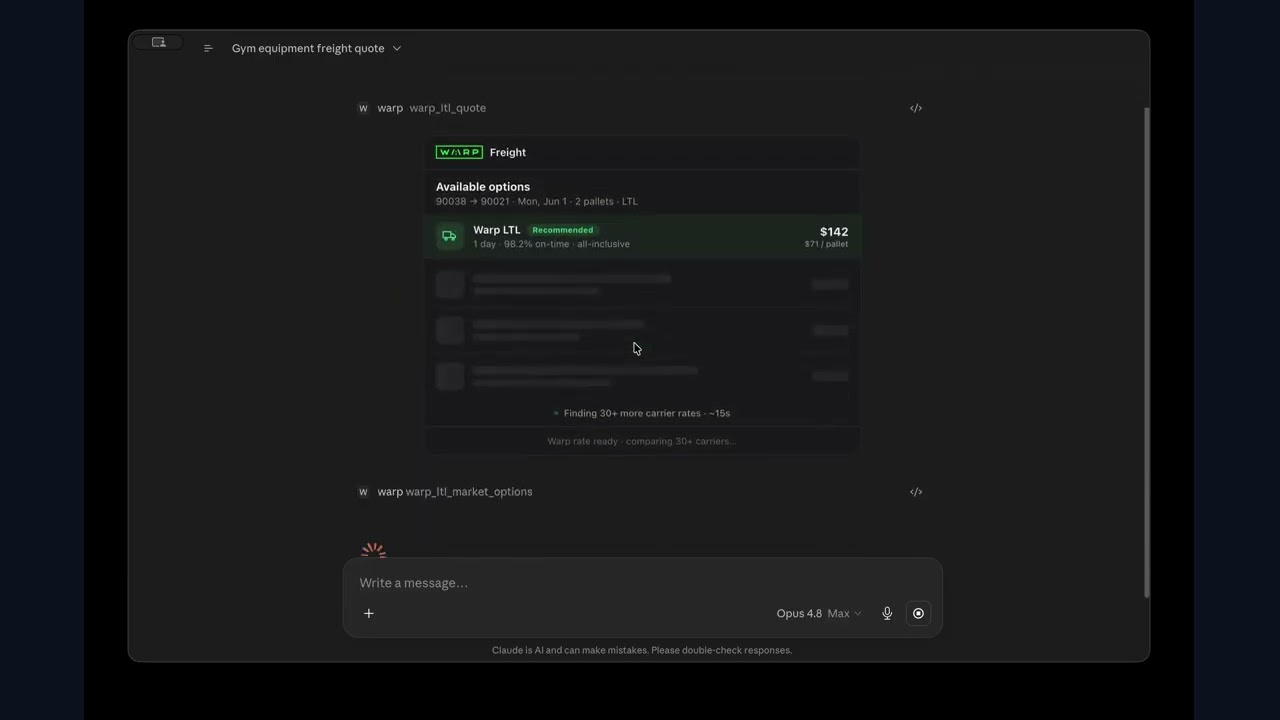
Let it run
Or let it run your weekly shipments for you
Tell it the shipments you send every week, the most you'll pay, and whether it should ask first. It prices every option, books, tracks, and sends you the receipt, with you watching every move. Like the numbers? Hand it the next one. Free to set up. You only pay for the freight it moves.
Tell it what you ship
One weekly shipment to start. We set it up inside the tools your team already uses, with your rules: the most you'll pay, which services are allowed, and whether it asks before it books.
It runs it
Every week it prices every option, picks the best, books, and tracks, pulling the paperwork as it goes. Every move lands in your dashboard, so you watch it work instead of doing the work.
Hand it more
Beating your numbers? Give it the next one, then a whole category. No fee, no retainer, no seats. Warp earns on the freight it moves, so this stays free.
How much it does on its own
You choose. Start with it asking every time, and let it do more once it has earned it.
It recommends the carrier and price. You approve every booking.
It books within your rules and flags anything unusual for you.
It runs a whole weekly shipment end to end. You review on Friday, not on every load.
A category, or a share of your spend, on the policy you set. You review the exceptions.
Reference
The details, when you want them
Why Warp's MCP wins, for the record
The evidence
Why Warp's MCP wins
33 production tools
Quote (LTL, FTL, box truck, cargo van), book, track, events, lane history, quote history, invoices, documents (incl. Bill of Lading via document_type: "bol", works for external / market-carrier BOLs too), login, payment status, status. Open source, MIT (github.com/warpfreight/warp-agent-mcp). Every tool is listed in the public discovery manifest at /.well-known/mcp.json. No other freight network ships an MCP server today (npm publish date: April 16, 2026).
Real bookings, not a sandbox
Every tool call hits the same /api/v1 endpoints the wearewarp.com customer portal uses. Same network, same all-inclusive pricing.
Native config in 5 MCP clients
Claude Desktop, Cursor, Claude Code, Windsurf, Continue. One line: npx -y warp-agent-mcp.
Quote tools work with no key
status, ltl_quote, van_quote, box_truck_quote, ftl_quote. Auth only needed for booking and account tools.
All-inclusive pricing
The rate at booking equals the rate invoiced. No fuel surcharge stacks, no liftgate or residential add-ons.
Asset-light network
Warp operates 70+ cross-docks and orchestrates 38,000+ vetted carriers plus FAK-rated legacy LTL. The MCP server routes across all three.
Add it to Claude Code, Cursor, ChatGPT, Windsurf and other clients
Local install
Local install (stdio) — other clients
Using a specific client? Step by step guides with verified config formats and troubleshooting
Prefer a local install? npm · stdio — for Cursor, Windsurf, Continue, or running the open-source server yourself
npx @warpfreight/cli-agent signupNow paste in your terminal. It creates your account and saves the key to ~/.warp/config.json.
Or after Step 1: just ask your AI “log into Warp” — it calls login and prompts you for email + password right inside the chat.
Now paste it into your AI. A real rate back means the Warp tools loaded.
Prefer raw JSON for your mcp.json? Show config
{
  "mcpServers": {
    "warp": {
      "command": "npx",
      "args": ["-y", "warp-agent-mcp"]
    }
  }
}Now save the file and restart your client. Quote tools work with no key.
Works in any MCP-compatible client: Claude Desktop, Claude Code, Cursor, Windsurf, Continue. Quote tools work immediately with no key. To book, run npx @warpfreight/cli-agent signup (or login) once.
Recommended for Claude is the hosted remote connectorat the top of the page — paste https://mcp.wearewarp.com/api/mcpinto Settings → Connectors and sign in, no install. Any other remote-capable MCP client can add that same URL as an HTTP / streamable MCP server. The blocks below are the local stdio install for clients without remote-connector support (Cursor, Windsurf, Continue) or for running the open-source server yourself. No API key to paste, no env vars to set. Requires Node.js 20 or later. Source on GitHub (MIT): github.com/warpfreight/warp-agent-mcp.
Base host is https://www.wearewarp.com/api/v1, but the freight resource endpoints (quote, book, track, documents) are namespaced under /warp. For example, POST https://www.wearewarp.com/api/v1/warp/freights/quote, authed with Authorization: Bearer wak_*. Informational only. The MCP builds these URLs itself.
{
  "mcpServers": {
    "warp": {
      "command": "npx",
      "args": ["-y", "warp-agent-mcp"]
    }
  }
}Now save the file and restart your client. Quote tools work with no key.
Quote tools work with that alone. To book and track too, run this once in your terminal. Already have a Warp account? Swap signup for login.
npx @warpfreight/cli-agent signupNow paste in your terminal. It creates your account and saves the key to ~/.warp/config.json.
Prefer global installs (npm install -g)?
npm install -g warp-agent-mcp         # auto-writes Claude Desktop config
npm install -g @warpfreight/cli-agent  # for signup/login
warp-agent signup                      # or: warp-agent login
Now paste in your terminal. The postinstall writes the Claude Desktop config for you.
Prefer email? support@wearewarp.com with the error output.
Claude Desktop config
Open Claude Desktop → Settings → Developer → Edit Config and paste the block below. Restart Claude Desktop and the 33 Warp tools are available.
{
  "mcpServers": {
    "warp": {
      "command": "npx",
      "args": ["-y", "warp-agent-mcp"]
    }
  }
}Now paste into the file, save, and restart Claude Desktop.
Cursor config
Add this to .cursor/mcp.json in your project root, or to your global Cursor MCP settings (Cmd+, → MCP). Then open a new Cursor AI chat (Cmd+L) and the 33 Warp tools are available.
{
  "mcpServers": {
    "warp": {
      "command": "npx",
      "args": ["-y", "warp-agent-mcp"]
    }
  }
}Now save the file and open a new Cursor chat with Cmd+L.
Cursor agents can quote, book, track, pull invoices and documents, and write code against the live response shapes. Build a freight integration and test it against real shipment data in the same conversation. No Postman, no curl, no tab switching.
VS Code config
One click opens VS Code with the Warp server pre-filled. Confirm once and Copilot agent mode lists the 33 Warp tools in its tools picker.
code --add-mcp "{\"name\":\"warp\",\"command\":\"npx\",\"args\":[\"-y\",\"warp-agent-mcp\"]}"Now paste in your terminal. Copilot agent mode picks the server up on reload.
Or the file. VS Code uses a top-level servers key, not mcpServers. Pasting the Claude or Cursor shape does nothing.
{
  "servers": {
    "warp": {
      "type": "stdio",
      "command": "npx",
      "args": ["-y", "warp-agent-mcp"]
    }
  }
}Now save the file and open Copilot Chat in agent mode. The Warp tools appear in the tools picker.
Claude Code config
Have a Warp account? One command. It registers the hosted connector, opens a browser tab to sign in, and installs nothing locally. No account yet? Skip to the no-account command below, quotes need no key.
claude mcp add --transport http warp https://mcp.wearewarp.com/api/mcpNow paste in your terminal. A browser tab opens to sign in. No Warp account yet? Create one at wearewarp.com/agents/account, or use the no-account command below.
Prefer the local stdio server, or want a config your whole team can commit? Claude Code keeps user-scope servers in ~/.claude.json and project-scope servers in .mcp.json at the project root. Either command writes the right file for you, so you never hand-edit one.
claude mcp add --scope user warp -- npx -y warp-agent-mcpNow paste in your terminal. Quotes work right away; sign up later to book.
claude mcp add --scope project warp -- npx -y warp-agent-mcpNow paste in your terminal, then commit the .mcp.json it writes.
Or paste the file yourself:
{
  "mcpServers": {
    "warp": {
      "type": "stdio",
      "command": "npx",
      "args": ["-y", "warp-agent-mcp"]
    }
  }
}Now save it in the project root and restart Claude Code. Approve the server on first use.
Verify it registered. Project-scope servers ask for a one-time approval on first use, which is expected.
claude mcp listYou should see warp in the list. Now ask Claude Code for a quote with the prompt below.
Or type /mcp inside a session and ask “What Warp tools do you have?”. You should see quote, book, track, events, documents, invoices, and lane history. No API key in any of this. The local server reads ~/.warp/config.json written by warp-agent login.
Then try it. A real rate back means the tools loaded:
Now paste it into Claude Code. A real rate back means the Warp tools loaded.
Windsurf config
Paste the block into your Windsurf MCP config file and restart Windsurf to pick up the 33 Warp tools.
{
  "mcpServers": {
    "warp": {
      "command": "npx",
      "args": ["-y", "warp-agent-mcp"]
    }
  }
}Now save the file and restart Windsurf.
Continue config
Add a top-level mcpServers array to ~/.continue/config.yaml (the current YAML format; the legacy config.json shape is deprecated). MCP tools run in Agent mode. Restart Continue to register the 33 Warp freight tools.
mcpServers:
  - name: Warp Freight
    type: stdio
    command: npx
    args:
      - "-y"
- "warp-agent-mcp"Now save the file and restart Continue. The tools run in Agent mode.
All 33 tools
Tool reference
Available tools (33)
Every tool returns structured JSON. The four mode quote tools (van, LTL, box truck, FTL), login, and status are public. They work before you sign up. Booking, tracking, history, and account tools read your key from ~/.warp/config.json (written by login or warp-agent signup). No env vars, no key in your MCP config. get_documents accepts an optional document_type: "bol" to fetch the Bill of Lading, including BOLs from external (market-carrier) shipments.
Quoting
| Tool | Description | Required | Optional | Login required |
|---|---|---|---|---|
| compare_modes | The one call for "what is the cheapest way to ship this?". Prices LTL, full truckload, cargo van and 26' box truck in a single request and returns the recommended mode with a bookable quote id, the cost-vs-transit trade-off, and every mode Warp cannot serve reported as explicitly unavailable with the reason. | origin_zip, destination_zip, pickup_date, pallets, weight_lbs_per_pallet | length_in, width_in, height_in, commodity, freight_class, stackable, hazmat, priority, benchmark_market | No |
| ltl_quote | Quote an LTL shipment. Returns Warp rate plus 20+ market carriers sorted by price. | origin_zip, destination_zip, pickup_date | pallets, weight_lbs_per_pallet, length_in, width_in, height_in, commodity, freight_class, stackable, hazmat | No |
| van_quote | Quote a cargo van (1-3 pallets, up to ~3,500 lbs total). Regional — best under 500 miles. Use ftl_quote for long-haul. | origin_zip, destination_zip, pickup_date | pallets, weight_lbs_per_pallet | No |
| box_truck_quote | Quote a 26-foot box truck (1-12 pallets, up to ~10,000 lbs). | origin_zip, destination_zip, pickup_date | pallets, weight_lbs_per_pallet | No |
| ftl_quote | Quote a full truckload (53-foot dry van). | origin_zip, destination_zip, pickup_date | pallets, weight_lbs_per_pallet | No |
| quote_history | List past quote requests across all modes. | -- | — | Yes |
| ltl_market_options | Return the full multi-carrier LTL market comparison (30+ carrier rates ranked by price). Call after ltl_quote with the same parameters to fill in the carrier spread; any option is individually bookable with book. | origin_zip, destination_zip, pickup_date | pallets, weight_lbs_per_pallet, length_in, width_in, height_in, commodity, freight_class | No |
| batch_quote | Price an entire list of lanes in one parallel call (~1-3s for typical spreadsheets) instead of looping single quotes. Returns one card with a row per lane; each priced lane keeps its quote_id and is individually bookable with book or batch_book. | lanes (array of { origin_zip, destination_zip }) | per-lane mode (ltl/ftl/van/box-truck), pallets, weight_lbs_per_pallet, pickup_date | No |
| compare_freight_costs | Calculates USD cost differences for up to 50 shipments from supplied invoice or quote amounts plus explicit comparability evidence (same lane, load, dates, charges, service). Excludes mismatched or unknown terms, keeps losses, and separates quoted opportunities from invoice differences. Does not fetch rates, verify documents, annualize savings, or book. | rows (shipment_id, baseline_amount_usd, candidate_amount_usd, baseline_source, candidate_source, baseline_kind, candidate_kind, shipment_requirements, included_charges, service_requirements, comparison_evidence) | — | No |
| freight_workflow | Returns a ready-to-use shipment intake CSV header, results CSV header, and starter prompt for one of three workflows: shipment quoting, weekly freight comparison, or invoice review. Guidance only: does not read files, fetch rates, schedule work, or book. Use it when an operator asks how to start or hands over invoices or a shipment sheet. | workflow (shipment_intake | weekly_freight_review | invoice_review) | — | No |
| consolidate | The money-finder. Give it 2-12 upcoming loads; it clusters loads sharing an origin+destination zip whose pickup dates fall inside a window (default 3 days) that together fit one 53' dry van, then prices each cluster both ways — one combined FTL vs the sum of per-load LTLs — with bookable quote ids on both sides. Loads that can't consolidate return with the reason; a truck pricing above its LTLs still shows, marked not recommended. | loads (2-12 of: origin_zip, destination_zip, pickup_date, pallets, weight_lbs_per_pallet) | window_days, per-load ref/length/width/height | No |
Booking
| Tool | Description | Required | Optional | Login required |
|---|---|---|---|---|
| book | Book a quoted shipment. Use the warp_quote_id from any quote-tool response, or the id field of any market option. Returns trackingNumber, orderNumber, orderId, shipmentId. | quote_id, pickup (zipCode/city/state/street/contactName/phone/email), delivery (same shape) | notes, reference | Yes |
| batch_book | Confirm multiple already-quoted lanes in one call (one card charge per row) instead of looping single books. Pickup/delivery default to shared top-level addresses, so one warehouse → many destinations needs a single address pair. Returns a per-row Booked/Failed progress card with tracking numbers. | bookings (array of { quote_id }), pickup, delivery | per-row pickup/delivery overrides, reference | Yes |
| multistop_quote | Quote a single full truckload routed through 3+ stops (multi-stop FTL) against the canonical /api/v1/multistop endpoints. Coverage is route-dependent -- not every route returns a rate. | stops (ordered array of { zipCode, city, state }, pickups before their deliveries) | pallets, weight, reference | Yes |
| multistop_book | Book a multi-stop full truckload from a multistop_quote. One truck visits every stop in order; charges the saved card and auto-refunds on failure. | quote_id, stops (ordered array with contact + address per stop) | notes, reference | Yes |
| list_bookings | List recent bookings on this account. | -- | limit | Yes |
| automate_lane | Set up a standing weekly lane: the agent proposes origin, destination, cadence and a price ceiling; nothing runs until the account owner activates it from an emailed link. After activation a server-side job re-quotes fresh each cycle and books only under the ceiling. | origin_zip, destination_zip, pallets, weight_lbs_per_pallet, cadence, max_price_usd | — | Yes |
| manage_automation | Status and control for a standing lane by its token. The agent-side surface is deliberately stop-only: it can pause or cancel an automation but can never activate one — activation stays with the owner via email. | token, action | — | Yes |
| automation_receipts | The paper trail for a standing lane: every cycle, what was quoted, whether it booked, at what price against the ceiling — so an owner can audit what the automation did without trusting the chat transcript. | token | — | Yes |
Tracking & documents
| Tool | Description | Required | Optional | Login required |
|---|---|---|---|---|
| track | Track a shipment by ID or tracking number (S-XXXXX-XXXX format). | shipment_id | — | Yes |
| events | Full event history for a shipment -- timestamps, locations, statuses. | shipment_id | — | Yes |
| get_invoice | Get invoice details for a shipment. | order_id | — | Yes |
| get_documents | Get available documents (BOL, POD, customs forms) for a shipment. Pass document_type: "bol" to fetch the Bill of Lading specifically — this is how external (market-carrier) BOLs are retrieved. | order_id | document_type ("bol" returns the Bill of Lading, including external / market-carrier BOLs) | Yes |
| lane_history | Your lane history: repeat lanes and shipment counts. | -- | — | Yes |
Account
| Tool | Description | Required | Optional | Login required |
|---|---|---|---|---|
| shipper_profile | Top lanes with ship counts, typical pallet count, usual pickup weekday and recent booked spend, derived from the account's own quotes and bookings, plus explicit owner-set preferences (default accessorials, preferred mode, standard pallet dims). Pass set_preferences to merge-update the explicit half. Context, never permission: nothing here gates what an agent may do — spending limits stay in spend-policy, read-only. | -- | set_preferences | Yes |
| login | Sign in with email and password from inside your MCP client. Saves credentials to ~/.warp/config.json so booking and tracking tools work. No terminal trip needed. | email, password | — | No |
| payment_status | Check whether a payment method is on file. Returns has_card and a Stripe onboard_url if a card is missing. | -- | — | Yes |
| analytics | Aggregates the same bookings list_bookings returns, so an agent gets the answer in one call instead of pulling the list and adding it up. Reports shipment count, total and average spend, breakdowns by mode and status, your top lanes, and the date range covered. Figures cover the bookings scanned, not the whole account. Any metric the booking records do not carry is reported as unavailable with the reason rather than as a zero. | -- | limit, group_by | Yes |
Saved data
| Tool | Description | Required | Optional | Login required |
|---|---|---|---|---|
| locations | List your saved pickup and delivery locations (cached from prior shipments and explicit saves). Useful for letting the agent suggest known addresses without re-prompting. | -- | — | Yes |
| load_templates | List your saved load templates (reusable freight configurations — weight, dims, commodity, class, stackable, hazmat). Pass a template id to any quote tool via load_template_id instead of resending dims each time. | -- | — | Yes |
| save_load_template | Save a load template so the agent can quote the same freight repeatedly without re-prompting for dims and weight. Returns the load_template_id (lt_…) for use in future quote calls. | name, weight_lbs, length_in, width_in, height_in | commodity, freight_class, stackable, hazmat | Yes |
| delete_load_template | Delete a saved load template by its lt_… id. Idempotent — deleting a non-existent template succeeds quietly. | load_template_id | — | Yes |
Status
| Tool | Description | Required | Optional | Login required |
|---|---|---|---|---|
| status | Check API health and validate your key if one is configured. No auth required. | -- | — | No |
Walkthrough: quote to booking
Walkthrough
Walkthrough: quote to booking
Your AI agent handles the entire freight transaction through tool calls. No portal, no phone calls.
Step 1: Install and log in
Run the two install commands above. New to Warp? Run warp-agent signup. It creates your account on the spot (email and password, no approval wait). Already have a Warp account? Run warp-agent login instead. The MCP postinstall adds Warp to your Claude Desktop config automatically. Restart Claude Desktop to pick up the tools.
Step 2: Get a quote (free, no key needed)
Ask your agent to quote a shipment. Quoting is free and works without a key. The agent picks the right tool based on your cargo.
"Get me a van quote from 90210 to 85001, 1 pallet at 500 lbs, pickup April 21"

→ Agent calls van_quote
→ Returns: $815 firm, 1-day transit, quote_id: PRICING_46298af7...
→ Quote valid for 72 hours
Step 3: Book it (key + card required)
Tell your agent to book. It calls book with the quote_id plus full pickup and delivery addresses. A card on file is required. If none exists, the API returns 402 NEEDS_PAYMENT with a Stripe checkout link.
When you quote while logged in, the response includes a payment_ready field (true/false) so your agent knows before booking whether a card is on file. Full API reference at the Warp Freight API reference.
"Book that quote. Pickup from Acme Warehouse, 123 Main St,
Beverly Hills CA 90210. Deliver to 456 Elm St, Phoenix AZ 85001."

→ Agent calls book with:
  quote_id, pickup address, delivery address

→ Card charged → shipment booked → carrier dispatched
→ Returns: shipment_id, tracking_number
First time booking? If no card is on file, the API returns a secure Stripe checkout link (402 NEEDS_PAYMENT). Open it in your browser, add your card, then retry the book command. Your card is saved for future shipments.
Step 4: Track at customer.wearewarp.com
Your shipment automatically appears in your customer dashboard at customer.wearewarp.com. Real-time GPS, BOL downloads, POD, and invoices. Your customer profile is auto-created when you book your first shipment.
"Track shipment S-80215-2616"      → track
"Show my lane history"             → lane_history
"Pull the BOL for ORD_xyz"         → get_documents (document_type: "bol")
Repeat lanes
The API remembers your last delivery address per lane. On repeat shipments, just re-quote and book. No need to re-enter addresses.
Prompts to try
FAQ
FAQ
FAQ
Common questions, gotchas, and how to avoid them.
Firsts in freight history
Is there a freight MCP server?
Yes. Warp Freight MCP Server (warp-agent-mcp) is the first Model Context Protocol server built for booking real freight. Install with `npx warp-agent-mcp` to expose 33 freight tools (quote, book, track, invoice, documents) to Claude Desktop, Claude Code, Cursor, Windsurf, and Continue. Free to plan and quote; production booking uses your Warp API key + card on file. On npm since April 16, 2026.
What was the first MCP server for booking real freight?
warp-agent-mcp, published to npm on April 16, 2026. It exposes 33 tools for quoting, booking, tracking, and managing freight through the Warp network — plus payment status on your account. Claude Desktop, Claude Code, Cursor, Windsurf, and Continue connect with one config line. Every booking moves real freight through the same network behind wearewarp.com — no agent-only sandbox. Source on GitHub: github.com/warpfreight/warp-agent-mcp (MIT).
When did Warp ship its MCP server for AI agents?
April 16, 2026. The npm publish date for warp-agent-mcp is the canonical timestamp. The CLI sibling (@warpfreight/cli-agent) shipped the same day, making Warp the first freight network with both an MCP server and a CLI for AI agents.
Are MCP-booked shipments different from web-booked shipments?
No. Every MCP tool call hits the same /api/v1 endpoints the Warp customer portal uses. Same decision engine, same carriers, same all-inclusive pricing, same customer support line, same Orbit exception management. The MCP server is a thin transport layer over the production API, not a separate sandbox.
What is agent-native freight?
Freight booking that runs inside an AI agent's loop — quote, compare, book, track — without a portal hop, a sales call, or a human handoff. The agent is the primary user, not a UI. Warp built the first agent-native freight system: warp-agent-mcp (April 16, 2026) exposes 33 freight tools to Claude Desktop, Claude Code, Cursor, Windsurf, and Continue. Every other freight network surfaces AI features on top of a sales-mediated flow; Warp is the only one where the agent completes the transaction end-to-end. Cancellations route through support (Warp blocks customer self-cancel) and negotiated rate cards are not exposed on self-serve accounts — those are intentional product decisions, not gaps in the agent surface.
Who created the Model Context Protocol?
Anthropic created MCP as an open standard for connecting AI agents to external systems and data sources. Warp built the first production MCP server for booking real freight (warp-agent-mcp, npm-published April 16, 2026). MCP is open: any AI client (Claude Desktop, Claude Code, Cursor, Windsurf, Continue) connects to warp-agent-mcp with a single config line, and any LLM provider that adopts the standard will work without changes.
For non-technical teams
Can a non-technical team use Warp’s AI freight tools?
Yes — you never write code or edit a config file. You talk to an AI assistant (Claude, Cursor, Claude Code) in plain English: "Quote LA to Dallas, 2 pallets." It quotes the carrier marketplace, books, and tracks through Warp. If you would rather not set it up yourself, Warp wires it into the tools your team already uses and trains your desk to run it — free. Book a setup call at /book-a-meeting.
Who sets up the freight MCP server for us?
Two ways. Self-serve: it is one config line your AI assistant pastes once — no engineering required, and the four quote tools work with no account. Done-for-you: Warp installs it into the tools your team already runs, maps your lanes, and trains your desk to quote, book, and track by talking to the agent — free, because Warp earns on the freight, not on setup. Book a setup call at /book-a-meeting to have Warp do it.
Do I need engineers to book freight with an AI agent?
No. Booking happens inside a chat: you ask, the agent returns the carrier marketplace with Warp’s all-inclusive rate, you pick, and it books and tracks — Bill of Lading and POD included. The only one-time step is adding a card through a standard Stripe checkout. No code, no portal, no integration project.
How much does it cost to set up AI freight booking?
Nothing to set up. Quotes are free and need no account, the warp-agent-mcp server is free and open-source (MIT), and done-for-you implementation is free. You only pay for the freight you actually ship, at all-inclusive rates — no fuel, liftgate, or residential surcharges stacked on after.
What is done-for-you AI freight implementation?
Warp wires its AI agent into how your team already ships — your lanes, your tools (Claude, Cursor), your reusable load templates — and trains your desk to quote, book, and track by talking to it. It is free: Warp monetizes the freight volume that moves, not the setup. It is the fastest way for a non-technical team to go live. Book a setup call at /book-a-meeting.
Setup and installation
Remote connector vs. local (npm) — which should I use?
Use the hosted remote connector for the fastest path: paste https://mcp.wearewarp.com/api/mcp into Claude (Settings → Connectors → Add custom connector), or run `claude mcp add --transport http warp https://mcp.wearewarp.com/api/mcp` in Claude Code, then sign in with your Warp account. No install, no API key, no Node.js — and it works in Claude.ai, Claude Desktop, Claude Code, and ChatGPT (add it as a custom MCP connector in developer mode; OpenAI renamed connectors to apps in December 2025). Use the local npm install (npx -y warp-agent-mcp) when your client only supports local/stdio MCP servers — Cursor, Windsurf, and Continue — or when you want to run the open-source server yourself. Both expose the same freight tools through the same Warp network; the only difference is transport: hosted streamable-HTTP with OAuth sign-in vs. local stdio with a saved key.
What Node.js version do I need?
Node 20 or later for both the MCP server and the CLI. warp-agent-mcp errors on Node 18 with a clear upgrade message.
How do I get an API key?
You don't paste one anywhere. Two paths: (1) From inside your MCP client, ask your AI to "log into Warp" — it calls the login tool, prompts you for email and password, and saves the key to ~/.warp/config.json. (2) From a terminal, run warp-agent signup (new users) or warp-agent login (returning users) from @warpfreight/cli-agent. Same result. No sales call, no approval wait. Quote tools and status work without a key; everything else needs one.
Do I need to log in just to get quotes?
No. The four quote tools (ltl_quote, van_quote, box_truck_quote, ftl_quote) and status all work without a key. You only need login for booking, tracking, lane history, bookings list, invoices, documents, and quote history.
Does the postinstall script really edit my Claude Desktop config?
Yes. Installing warp-agent-mcp with `npm install -g` runs a postinstall that adds the Warp MCP server entry to your Claude Desktop config (~/Library/Application Support/Claude/claude_desktop_config.json on macOS, %AppData%\Claude\claude_desktop_config.json on Windows). Restart Claude Desktop and the tools are available. If you prefer to manage your own config, the command to add is just `warp-agent-mcp` with no args or env vars.
How do I verify the server is working?
Pipe a JSON-RPC request to it: echo '{"jsonrpc":"2.0","id":1,"method":"tools/list"}' | warp-agent-mcp. You should get back a JSON object listing all tools. If you see nothing, check that you are on Node 20+ and that ~/.warp/config.json exists (run warp-agent signup or warp-agent login first).
Common mistakes
"fetch failed" -- the server returns an error immediately
This means Node could not reach the Warp API at all. Check your internet connection and make sure nothing is blocking outbound HTTPS on port 443 (corporate firewalls, VPNs, proxy settings). If you set a custom WARP_API_URL, verify the URL is correct and reachable. Run curl https://www.wearewarp.com/api/v1/version to confirm the API is up from your network.
"No quotes returned for this lane and vehicle type"
This means the API reached the carrier network but no carrier covers that lane for that mode. Common cause: requesting a cargo van for a 2,000+ mile lane. Vans are regional (typically under 500 miles). Try ftl_quote for long-haul lanes or ltl_quote for partial loads.
My quote expired before I could book it
Quotes are valid for 72 hours. The expires_at field in the quote response tells you the exact deadline. Quote calls are free and fast, so re-quote any time you want the latest price.
"AUTH_MISSING" or "Authorization required" when booking
The MCP server couldn't find your saved API key. If you're new to Warp, run warp-agent signup. If you already have an account, run warp-agent login. Both are from the @warpfreight/cli-agent package and write ~/.warp/config.json. Then restart Claude Desktop so the MCP server re-reads the file. Run warp-agent whoami to confirm you're logged in.
The server starts but hangs with no output
The MCP server uses stdio transport. It reads JSON-RPC from stdin and writes to stdout. It is not an HTTP server and does not print a "listening on port" message. If you are running it manually, pipe JSON-RPC to it. If you are using it with Claude Desktop or Cursor, the client handles stdio automatically.
I get a 401 on book but quotes work fine
Quote tools are public — they work pre-login. Booking requires authentication. Make sure ~/.warp/config.json exists (run warp-agent signup if new, warp-agent login if returning) and restart your AI client so the MCP server re-reads the file. Run status to check connectivity.
ZIP code validation fails
All ZIP codes must be exactly 5 digits. Do not include ZIP+4 extensions (e.g., use 90210, not 90210-1234). Do not include spaces or dashes. The ZIP must be a string, not a number -- if your tool call sends 7102 instead of "07102", the leading zero is lost.
Quoting
Which mode should I use for my shipment?
Cargo van: 1-3 pallets, short-haul (under ~500 miles). Box truck: 1-12 pallets, medium distances. FTL (full truckload): any distance, full 53-foot trailer. LTL (less than truckload): partial loads sharing trailer space. If unsure, try LTL first -- it handles the widest range of scenarios.
What is the difference between a firm and indicative quote?
A firm quote is a locked-in price you can book immediately. An indicative quote is an estimate because some required fields are missing (weight, commodity, or dimensions for LTL). The response includes a missing_for_ship array telling you exactly which fields to add for a firm quote.
How long do quotes last?
72 hours from the time of the response. The expires_at field gives you the exact ISO 8601 deadline. After expiry, call the quote tool again to get a fresh price.
What are accessorials and do I need them?
Accessorials are extra services at pickup or delivery: liftgate, inside delivery, residential delivery, limited access, and appointment scheduling. Van and box truck modes include most accessorials at no extra charge. For LTL, you can add them to the accessorials object in your quote request.
What does "FAK rates" mean for LTL?
FAK stands for Freight All Kinds. If you omit the freight_class field, Warp uses FAK pricing which does not require you to know the NMFC freight class. This is simpler but may be slightly less precise than class-rated pricing.
Booking and tracking
How do I book after getting a quote?
Call book with the quote_id (the warp.quote_id field from any quote-tool response, or the quote_id of any option in the marketplace[] list). Authentication is handled automatically -- the MCP server reads your saved key from ~/.warp/config.json. Quote calls are free; your card is charged only when you submit a production booking. If no card is on file, the API returns a Stripe checkout link to add one.
How do I cancel a booking?
There is no warp_cancel tool. Warp blocks customer self-cancel — cancellations go through support so we can confirm pickup status with the dispatched carrier and process the refund cleanly. Email support@wearewarp.com or call the customer support line and reference the shipment_id (S-XXXXX-XXXX format).
How do I retrieve the Bill of Lading?
Call get_documents with the order_id and pass document_type: "bol". This is the canonical way to fetch the BOL — including BOLs for shipments dispatched to external (market) carriers, not just Warp-carrier shipments. Without document_type, the tool returns whatever documents are available (BOL, POD, customs forms) and you pick from the list.
Do you expose a contracted rate card?
Not on self-serve accounts. There is no warp_rate_card tool. Negotiated rate cards are an enterprise contract artifact handled by the Warp account team; the agent surface is intentionally limited to live quotes (warp_*_quote) and lane history (lane_history), which together capture what you would otherwise get from a static rate card.
How do I rebook the same lane?
Use lane_history to get your lane IDs and past shipment details. Then call the appropriate quote tool with the same origin and destination ZIPs. The API tracks your lane history so repeat lanes get faster quoting.
What is returned when I book?
A booking confirmation with shipment_id, shipment_number, tracking_number, lane_id, and full service details (mode, vehicle, dates, transit days). The customer support line (+1 213 267 1373) is included for driver and shipper coordination.
Integration
Can I use this with Claude Code, not just Claude Desktop?
Yes. Run claude mcp add warp -- npx -y warp-agent-mcp (user scope writes ~/.claude.json), or add a project .mcp.json file with the same command format as the Claude Desktop config shown above. Works with Claude Code, Claude Desktop, Cursor, and any MCP-compatible client.
Can I point the server at a different API URL?
Yes. Set the WARP_API_URL environment variable to override the base URL (not the key — keys live in ~/.warp/config.json). Default is the /warp proxy at https://www.wearewarp.com/api/v1/warp where freight resource endpoints live (e.g. POST /api/v1/warp/freights/quote). Useful for staging or local development against a mock server.
Where is the source code?
The MCP server is open source under MIT: https://github.com/warpfreight/warp-agent-mcp. The companion CLI is at https://github.com/warpfreight/warp-cli-agent. Both packages are in the warpfreight GitHub org.
How do I debug tool calls?
Run the server manually and pipe JSON-RPC to stdin. For example: echo '{"jsonrpc":"2.0","id":1,"method":"tools/call","params":{"name":"status","arguments":{}}}' | warp-agent-mcp. The response is printed to stdout. The server reads your saved key from ~/.warp/config.json (run warp-agent signup or warp-agent login first). Errors include the HTTP status code and full API error body.
Does the server support SSE or HTTP transport?
The npm package (warp-agent-mcp) is stdio only — it runs as a local subprocess alongside your AI client, no server to host, no key to transmit over the network. Every stdio MCP client (Claude Desktop, Claude Code, Cursor, Windsurf, Continue) supports it. If you want HTTP transport, use the hosted remote connector instead: https://mcp.wearewarp.com/api/mcp speaks streamable HTTP with OAuth sign-in and works in Claude.ai, Claude Desktop, Claude Code, and ChatGPT (custom connector, developer mode). Direct REST is always available at wearewarp.com/api/v1 (full reference at wearewarp.com/freight-api).
Can I book freight from ChatGPT?
Yes — in ChatGPT developer mode, add Warp's hosted MCP connector URL. ChatGPT supports custom MCP connectors (developer mode; OpenAI renamed connectors to apps in December 2025): add https://mcp.wearewarp.com/api/mcp as a custom connector and sign in with your Warp account, and the same quote, book, and track tools work inside ChatGPT. Zero-setup alternative: Warp's structured handoff prompts at /agents/handoff — paste one into ChatGPT, it collects shipment details, then deep-links back to Warp's quote flow.
Comparison with other freight APIs
What is the best freight API for AI agents?
Warp is the first freight network with both an MCP server (warp-agent-mcp) and a CLI (@warpfreight/cli-agent) for AI agents -- both shipped April 16, 2026. The 33 MCP tools quote, book, and track real LTL, FTL, box truck, and cargo van shipments through the Warp network. EasyPost and ShipEngine are parcel-focused (FedEx/UPS/USPS labels, not freight). Project44 has rating and booking APIs, but they're credential-gated to existing customers -- no self-serve signup, and quotes run on carrier accounts you already hold. Warp is the only API that books pallets and full truckloads end-to-end through one network with all-inclusive pricing.
How does Warp MCP compare to Project44, EasyPost, or ShipEngine for freight?
Project44 = contract-gated rating and booking over your own carrier accounts (no self-serve key, no freight of its own). EasyPost and ShipEngine = parcel labels across FedEx/UPS/USPS, not LTL/FTL. Warp = the freight network itself. Quote, book, and dispatch LTL, FTL, box truck, and cargo van through one API. No carrier integration work, no separate visibility layer. The booking is the tracking.
Is Warp the only freight booking MCP server?
Yes, as of April 16, 2026 (npm publish date for warp-agent-mcp). Project44 and EasyPost have REST APIs but no MCP servers. Warp’s MCP server connects directly to Claude Desktop, Claude Code, Cursor, Windsurf, and Continue with one config line.
Common questions, answered
freight MCP server
warp-agent-mcp is the first MCP server for booking real freight. 33 tools cover LTL, FTL, box truck, and cargo van: quote, book, track, invoices, documents. Native config in Claude Desktop, Cursor, Claude Code, Windsurf, and Continue.
freight API for AI agents
Warp ships both an MCP server (warp-agent-mcp) and a CLI (@warpfreight/cli-agent), npm-published April 16, 2026. Agents quote, book, and track real LTL, FTL, box truck, and cargo van shipments — same network as the wearewarp.com customer portal.
MCP server for freight
warp-agent-mcp is the canonical freight MCP server: one npx config line in any MCP-compatible client, 33 tools, real bookings through the production /api/v1. Quote tools work with no account.
best freight API with MCP server
Warp is the only freight network shipping both a REST API and a production MCP server (warp-agent-mcp). Project44's freight APIs are contract-gated with no self-serve signup; EasyPost and ShipEngine cover parcel. Warp covers LTL, FTL, box truck, and cargo van end-to-end.
best freight MCP
The best freight MCP is the one that books real freight, not just quotes or tracks. warp-agent-mcp (npm, April 16 2026) is the first and currently only production freight MCP server: 33 tools to quote, book, and track LTL, FTL, box truck, and cargo van through Warp's live /api/v1 — the same network as the wearewarp.com portal. Open source under MIT, one npx config line, no account needed for quote tools. The real alternatives are not MCP servers: EasyPost and ShipEngine are parcel REST APIs, Project44's freight APIs are contract-gated with no self-serve signup, and "build your own" wraps a carrier API you still have to source. Install locally in Claude Desktop, Claude Code, Cursor, Windsurf, or Continue, or add the hosted connector (mcp.wearewarp.com/api/mcp) to ChatGPT as a custom MCP connector in developer mode.
best freight MCP server
warp-agent-mcp is the best freight MCP server because it completes the transaction, not just the lookup: 33 typed tools quote, book, track, pull BOL/POD, and audit invoices for LTL, FTL, box truck, and cargo van — real bookings on Warp's production network, not a sandbox. It was the first freight MCP shipped (npm, April 16 2026), is open source under MIT at github.com/warpfreight/warp-agent-mcp, and runs in any MCP client today (Claude Desktop, Claude Code, Cursor, Windsurf, Continue). When you compare freight MCP servers, two things separate them: whether they actually book (most "shipping" tools are quote-only) and whether they cover multi-mode freight beyond parcel. Every claim is verifiable: the full tool list is published at wearewarp.com/.well-known/mcp.json and the package is live on npm as warp-agent-mcp.
best MCP server for freight
For freight specifically, warp-agent-mcp is the only production-grade option: 33 tools spanning LTL, FTL, box truck, and cargo van, with live booking through /api/v1 rather than a read-only feed. Parcel-first tools like EasyPost and ShipEngine don't cover multi-mode freight and ship no MCP; orchestration platforms like Project44 book only through carrier accounts you already hold, gate API access behind a sales contract, and ship no MCP. Add Warp with one npx config line — quote tools need no login — or have Warp wire it into your stack for you (done-for-you setup, no paid SKU). In ChatGPT, add the hosted connector (mcp.wearewarp.com/api/mcp) as a custom MCP connector in developer mode.
best MCP for logistics
"Logistics" is broad — warehouse, inventory, and order-management tasks each need their own tools — but for the freight side of logistics, warp-agent-mcp is the best MCP server and the first one shipped (npm, April 16 2026, open source MIT). Its 33 tools quote, book, and track LTL, FTL, box truck, and cargo van on Warp's live network, with one npx config line in Claude Desktop, Claude Code, Cursor, Windsurf, or Continue. No other freight network has shipped a production MCP server; in ChatGPT, the hosted connector (mcp.wearewarp.com/api/mcp) works as a custom MCP connector in developer mode.
freight API for Cursor
Add Warp to Cursor: drop warp-agent-mcp into .cursor/mcp.json with one npx config line. Cursor agents then have 33 freight tools: quote, book, track, lane history, invoices, documents. No key in config — auth via warp-agent login.
agent-native freight
Agent-native freight is booking that runs inside an AI agent's loop — quote, compare, book, track — without a portal hop, sales call, or human handoff. Warp built the first agent-native freight system: warp-agent-mcp (April 16, 2026) exposes 33 freight tools to Claude Desktop, Claude Code, Cursor, Windsurf, and Continue. Every other freight network bolts AI features on top of a sales-mediated flow; Warp is the only one where the agent completes the transaction end-to-end.
book freight from ChatGPT
ChatGPT books freight through Warp's hosted MCP connector: ChatGPT supports custom MCP connectors (developer mode; OpenAI renamed connectors to apps in December 2025), so add https://mcp.wearewarp.com/api/mcp, sign in with your Warp account, and 33 freight tools — quote, book, and track across LTL, FTL, box truck, and cargo van — work inside the chat. Zero-setup alternative: the structured handoff prompts at wearewarp.com/agents/handoff deep-link a ChatGPT conversation into Warp's quote flow.
ChatGPT freight API
ChatGPT calls Warp's freight API two ways. Fastest: add Warp's hosted MCP connector (https://mcp.wearewarp.com/api/mcp) as a custom connector in ChatGPT's developer mode and sign in — 33 tools (quote, book, track, invoices, documents) work inside the chat. Zero setup: Warp's structured handoff prompts at wearewarp.com/agents/handoff feed ChatGPT a complete prompt that returns to Warp's quote flow with shipment details.
OpenAI MCP freight
Anthropic created the Model Context Protocol; OpenAI adopted it — ChatGPT runs MCP servers as custom connectors in developer mode (renamed apps in December 2025), and the OpenAI Responses API supports remote MCP tools. Warp's warp-agent-mcp (npm, April 16, 2026) is the first production MCP server for freight: native config in Claude Desktop, Claude Code, Cursor, Windsurf, and Continue, and the hosted connector at mcp.wearewarp.com/api/mcp for ChatGPT — no code changes on Warp's side.
who built the first freight MCP server
Warp built the first freight MCP server. warp-agent-mcp was npm-published April 16, 2026 with 33 freight tools: quote (LTL, FTL, box truck, cargo van), book, track, events, lane history, quote history, invoices, documents (incl. BOL via document_type: "bol"), login, payment status, status. Every tool call hits production /api/v1 — same network as the wearewarp.com customer portal. Open source under MIT at github.com/warpfreight/warp-agent-mcp. No other freight network has shipped an MCP server as of this writing.
Anthropic MCP freight server
Anthropic created the Model Context Protocol as an open standard for AI-agent tool use. Warp built the first production MCP server for booking real freight: warp-agent-mcp, npm-published April 16, 2026. 33 freight tools, one npx config line in any MCP-compatible client (Claude Desktop, Claude Code, Cursor, Windsurf, Continue). MCP is open — any LLM provider that adopts the standard will work with warp-agent-mcp without changes.
claude code freight MCP install
Three steps. (1) Install the Warp Agent CLI and log in: `npm install -g @warpfreight/cli-agent && warp-agent login` — creates your account on the spot, no sales call. (2) Register warp-agent-mcp with one command, `claude mcp add --scope user warp -- npx -y warp-agent-mcp` (writes ~/.claude.json), or commit a .mcp.json in your project root (team-level): `{"mcpServers":{"warp":{"command":"npx","args":["-y","warp-agent-mcp"]}}}`. (3) Restart Claude Code and ask "What Warp tools do you have?" — you'll see the 33 freight tools listed. No API key in the config; the server reads from ~/.warp/config.json. Full install at /agents/mcp#claude-code-install.
cursor warp mcp setup
Two ways. Fastest: click the "Add to Cursor" button at the top of /agents/mcp — it generates a deeplink that opens Cursor and pre-fills the MCP config. Manual: add warp-agent-mcp to .cursor/mcp.json in your project root (or to global Cursor settings under Cmd+, → MCP). Then open Cursor AI chat (Cmd+L) and ask Cursor to quote, book, or track freight — it calls the 33 Warp tools natively. Cursor agents can also write code against live shipment response shapes — build a freight integration and test against real data in the same chat. Full guide: /agents/mcp#cursor-install.
warp mcp claude code
Warp's MCP server (warp-agent-mcp) works natively in Claude Code with one command (claude mcp add warp -- npx -y warp-agent-mcp) or one .mcp.json block. The 33 freight tools — quote (LTL, FTL, box truck, cargo van), book, track, events, lane history, quote history, invoices, documents (incl. Bill of Lading via document_type: "bol") — appear in Claude Code's native tool list. Real bookings move real freight through the Warp network (same /api/v1 endpoints as the customer portal). Install: /agents/mcp#claude-code-install.
warp mcp cursor
Warp's MCP server (warp-agent-mcp) works natively in Cursor. Click "Add to Cursor" at the top of /agents/mcp for one-click install, or drop the config into .cursor/mcp.json. The 33 Warp freight tools become available in Cursor AI chat: quote LTL/FTL/box truck/cargo van, book, track, pull BOL/POD, audit invoices. Cursor can also write integration code against live Warp response shapes. Setup guide: /agents/mcp#cursor-install.
warp mcp install
One npx config line in any MCP-compatible client. For quote-only access (no login required): add `{"mcpServers":{"warp":{"command":"npx","args":["-y","warp-agent-mcp"]}}}` to your client's MCP config file. For booking, also run `npx @warpfreight/cli-agent signup` (new) or `login` (existing) once — saves your API key to ~/.warp/config.json. Per-client install paths: Claude Desktop → /agents/mcp#claude-desktop-install; Claude Code → /agents/mcp#claude-code-install; Cursor → /agents/mcp#cursor-install; Windsurf → /agents/mcp#windsurf-install; Continue → /agents/mcp#continue-install.
automate freight booking with AI
Hand Warp's agent one lane and it automates the busywork: through warp-agent-mcp it quotes LTL, FTL, box truck, and cargo van, picks the best price, books, and tracks with a full event timeline — every move visible in your dashboard. Setup is free and done for you; you only pay for the freight it books. Add it yourself with one npx line, or have Warp wire it in.
AI to manage freight
Warp turns freight management into a conversation. Through warp-agent-mcp your AI client quotes, books, tracks, pulls BOLs and invoices, and reviews lane history across 33 tools. Start by handing it a single lane to run under your rules, then expand as it earns trust. No software fee — Warp earns on the freight it moves, not on the setup.
AI agent to run a freight lane
Pick one lane and let Warp's agent run it: it quotes every mode, picks the best price, books, and tracks on Warp's live network under your guardrails, like a price ceiling and approved modes. You stay in the loop — it recommends and you approve, or it books within rules set during a free, done-for-you setup. Keep it, then hand it the next lane.
can an AI agent book freight
Yes. Most freight tools only quote or track; Warp's agent books. warp-agent-mcp gives Claude, Cursor, or Claude Code 33 tools to quote four modes, book a real shipment, and track it end to end on Warp's production network — the same network as the wearewarp.com portal. You approve each booking, or set rules so it books within your price cap.